Clicks Per Second Test
Pick a timer length, hammer the pad, get your CPS with a rating against typical players. Your best score is stored in your own browser - nothing is uploaded anywhere.
Clicks per second test
Pick a timer, then click the pad as fast as you can. The first click starts the clock; the result is clicks per second with a rating against typical players.
– CPS
Clicks 0 · Time left 5.0s
Rating: –
Your best (5s): –
| CPS | Rating | What it means |
|---|---|---|
| 1 - 4 | Slow | Single clicks only, or a faulty switch |
| 4 - 6 | Average | Most casual players land here |
| 6 - 8 | Fast | Butterfly or drag techniques pay off |
| 8 - 12 | Very fast | Top tier - jitter or butterfly clicking |
| 12+ | Elite | Competitive Minecraft / osu territory |
How the scoring works
- The first click starts the clock. Warm-up clicks cost you nothing - only presses after the timer starts are counted.
- Every press on the pad counts once. The counter reads real pointer events, so a switch that drops a press simply does not score - which makes this a hardware honesty test too.
- The result is one decimal of CPS. Ratings: under 4 slow, 4-6 average, 6-8 fast, 8-12 very fast, 12+ elite. The table under the tool stays on screen while you test.
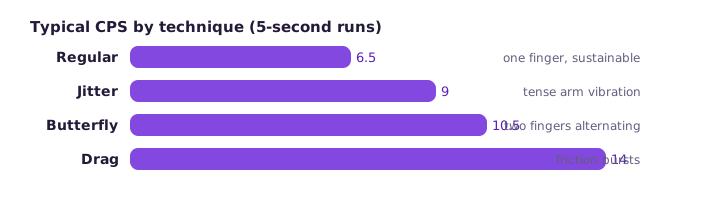
Techniques, honestly ranked
Regular clicking (index or middle finger) tops out around 6-7 CPS for most people and is gentle on the switch. Butterfly clicking - two fingers alternating on one button - reliably reaches 8-12 and is the standard scoreboard technique. Drag clicking drags a finger across the button so friction fires multiple switches per stroke: huge numbers on textured buttons, near-zero on smooth ones, and brutal on switch life. Jitter clicking tenses the arm to vibrate the finger - fast but tiring, and inconsistent between sessions.
Whichever you use, the physical limit is the switch, not the finger: a mouse rated at 20 million presses dies faster under butterfly clicking, and a worn switch starts double-firing. If your scores swing wildly between runs, run the double click test before blaming your technique.
Frequently asked questions
What is CPS in clicking?
Clicks per second - how many full presses you land in one second of timed clicking. It is the standard scoreboard number in Minecraft PvP communities and a quick sanity check that a mouse switch is registering every press.
Which timer should I use?
Five seconds is the community default because it is long enough to smooth out a slow start but short enough to keep peak speed. Use one or two seconds for pure burst checks and thirty or sixty for endurance.
Does a faster CPS help in games?
Only where the game counts individual clicks - Minecraft PvP combat, some idle clickers, osu! maps. In most shooters and MOBAs, aim quality beats click speed by a wide margin; treat CPS as a warm-up metric, not a skill ceiling.
Is jitter or butterfly clicking bad for the mouse?
Both techniques hammer the switch far beyond its rated actuation pattern. They shorten switch life and on lighter mice can register unintended doubles - which is exactly what our double click test exposes.
My CPS dropped suddenly - why?
Nine times out of ten it is the switch, not the hand: a worn left button starts dropping presses, and every dropped press cuts the score. Run the button test above; missing counts confirm hardware before you blame your technique.